Request a Quote
Tell us your product type, quantity, logo requirements, packaging needs, and destination country. Our team will reply within 12 hours to discuss your requirements and bulk quote.

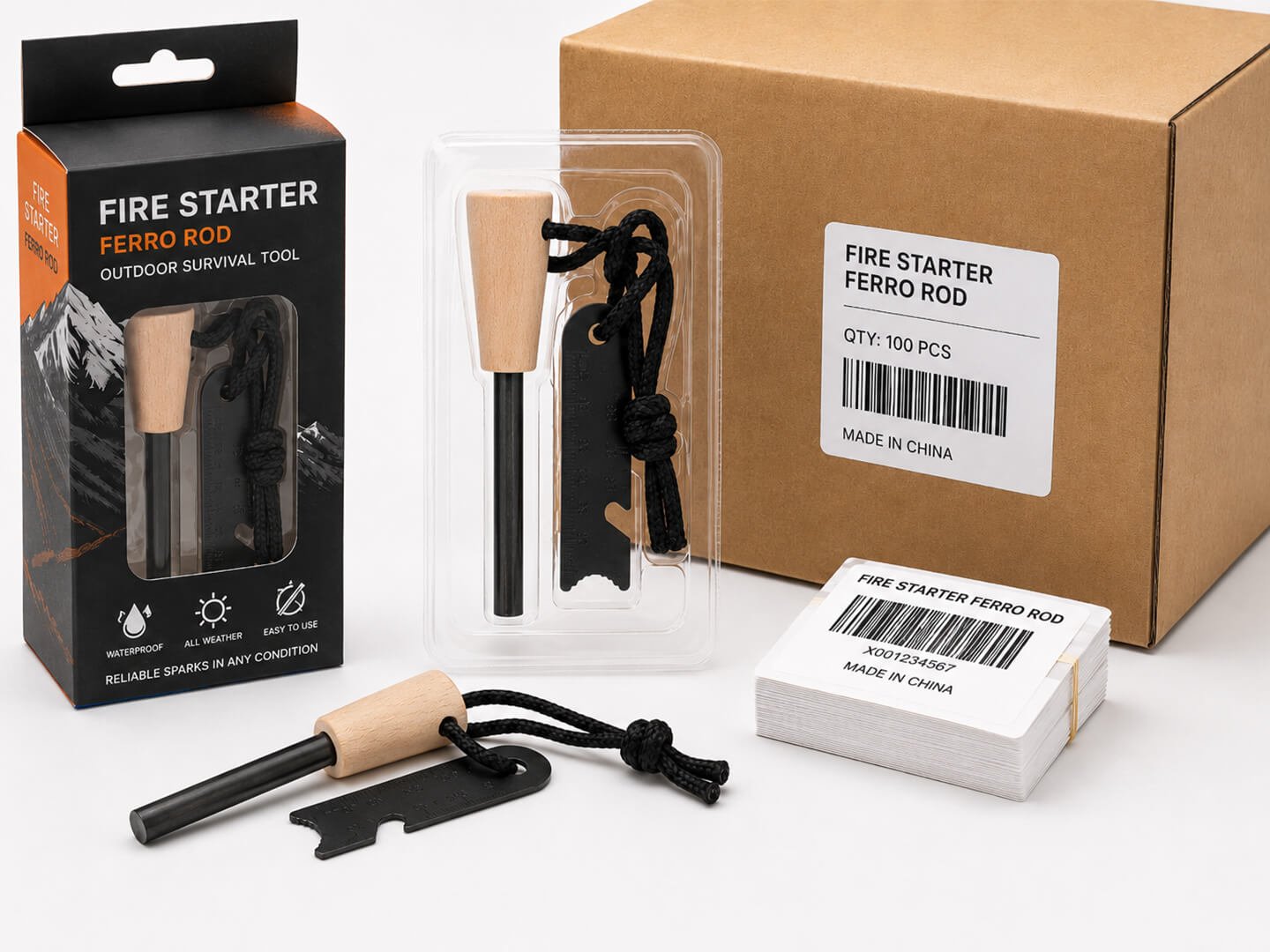
An FNSKU label is an Amazon item label used to identify inventory assigned to a seller. Check barcode eligibility in Seller Central, generate the correct label file, and match it to the unit before shipment.
Looking for a reliable ferro rod manufacturer for your brand?
Compare factory pricing, MOQ options, and customization details before you commit.
No commitment · Reply within 12h · MOQ from 50 pcs
FNSKU stands for Fulfillment Network Stock Keeping Unit. It is a unique barcode that Amazon assigns to a product listing under a specific seller account. When a unit carries an FNSKU label, Amazon’s receiving system knows exactly which seller owns that unit and can route it correctly through the fulfillment network.
An FNSKU is not the same as an ASIN, a seller SKU, or a UPC/EAN. Each serves a different purpose in the Amazon ecosystem. Confusing them leads to shipment rejections and lost inventory.
| Code | What It Identifies | Who Assigns It | Example Format |
| FNSKU | A specific seller’s inventory unit | Amazon | X001ABC123 |
| ASIN | A product in Amazon’s catalog | Amazon | B07XYZ1234 |
| Seller SKU | Your internal tracking code | You (the seller) | MY-SKU-001 |
| UPC/EAN | A product by its manufacturer | GS1 or manufacturer | 012345678901 |
A critical point: a single ASIN does not share one FNSKU across all sellers. Each seller account generates its own FNSKU for the same ASIN. If two sellers list the same product, they will have different FNSKUs. That is the entire mechanism that prevents commingling.
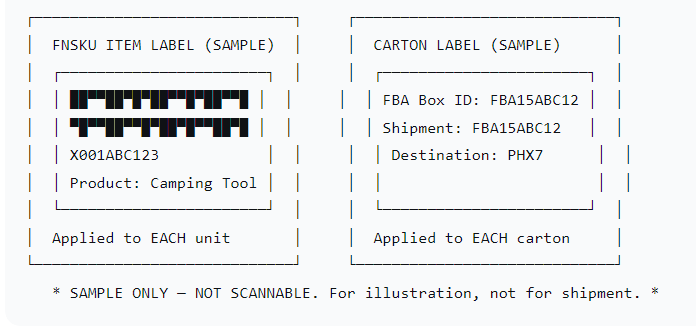
FNSKU labels are item-level labels. They identify individual sellable units. Carton labels (also called FBA box ID labels or shipment ID labels) identify the outer shipping boxes in a shipment. These are separate requirements and serve different functions-.
Every sellable unit needs its own FNSKU. Every shipping carton needs its own unique FBA box ID label printed from the shipment workflow. Do not confuse the two, and do not assume one replaces the other.
Figure 1: FNSKU Item Label vs. Carton Label (Illustration)
Not every product requires an FNSKU label. The rules changed significantly on March 31, 2026, and apply to shipments into US fulfillment centers.
The current policy distinguishes between brand owners and resellers:
The March 31, 2026 change also ended commingling. Inventory from different sellers is now tracked separately, which is why every unit must carry a seller-specific FNSKU.
These rules apply to shipments into the US marketplace. For other marketplaces, the seller should verify the target site’s current barcode settings in Seller Central. Barcode eligibility is determined per ASIN, per account, per marketplace. Do not assume a product that qualified last quarter still qualifies today.
The practical takeaway for procurement managers: before confirming a production run with your supplier, check the barcode preference for each ASIN in your Seller Central account. If the FNSKU column shows an X00 code, the unit needs an FNSKU label. If it shows B0 or a UPC, verify whether your account still qualifies for the manufacturer barcode exemption.

The process has five concrete steps. Each one matters because a mistake at any stage propagates downstream.
Step 1: Verify the sales marketplace and SKU. Confirm the marketplace where the inventory will be received. Barcode settings are marketplace-specific. Verify that the SKU’s barcode preference is set to “Amazon barcode” in FBA settings. If an existing SKU was created with a manufacturer barcode preference, that preference is locked at creation and cannot be changed. In that case, you need a new SKU for the listing.
Step 2: Export labels from Seller Central. Go to Manage FBA Inventory, select the product, and click Print Item Labels. Alternatively, use the shipment workflow’s labeling page. Download the PDF file. Do not create your own barcode. The FNSKU is generated by Amazon and must be printed from the source file.
Step 3: Compare product name and status. Before printing, verify that the product title and FNSKU on the label match the intended SKU. Mismatches happen when multiple SKUs share similar names or when a listing was recreated. A wrong FNSKU means the shipment will be mislabeled.
Step 4: Print using the correct template. Amazon supports several label sheet formats. Common options include 21 labels per page on A4 (63.5 mm × 38.1 mm) and 30 labels per page on US Letter (1″ × 2-5/8″). Print at 300 DPI or higher with 100% scaling. Use black ink on white background. Do not rescale to fit a different sheet size.
Step 5: Test-scan a physical label. Before mass application, apply one label to a sample unit and test-scan it with a barcode scanner or a scanner app. Confirm the decoded value matches the FNSKU string. This catches printing defects, scaling errors, and barcode quality issues before they affect the entire shipment.
There is no single universal label size for every product. The right size depends on your printer, your label sheets, and the product surface. The principle is simple: the barcode must scan reliably on the first attempt.
✓ Free samples available ✓ Custom logo & packaging ✓ ISO-certified factory
The FNSKU label must be applied to a flat, smooth surface on the sellable unit. Never place it on a curve, a corner, or a seam. The scanner needs a flat plane to read the barcode cleanly.
Leave at least 0.25 inches (approximately 6 mm) between the label edge and the packaging edge. This prevents the label from peeling during handling and gives the scanner clean quiet zones on both sides of the barcode.
If the product is poly-bagged, the FNSKU label should be placed on the outside of the polybag, not inside it. A barcode that must be read through wrinkled plastic will fail inspection. If the product is a bundled set, apply the FNSKU to the bundle’s outer packaging and cover the individual unit barcodes underneath.
What about the original manufacturer barcode? In most FNSKU-required scenarios, the FNSKU label should fully cover the original UPC/EAN barcode. If both barcodes are visible, the scanner may read the wrong one and misroute the unit. The exception is Transparency-enrolled products. Transparency codes must remain visible and must not be overlapped or covered by the FNSKU label-. If your account uses Transparency, follow the specific label templates provided in Seller Central. Do not assume you can cover all original codes without checking your Transparency requirements.
Amazon US no longer offers prep and item labeling services for FBA shipments. Effective January 1, 2026, sellers must either label their own products or arrange for a third party to do it. Amazon will not apply FNSKU labels on your behalf at the fulfillment center.
This means the labeling responsibility flows to whoever physically prepares the goods before they leave the origin warehouse. In a typical private-label supply chain, that is either the seller’s own team or the manufacturing partner.
For buyers sourcing from Survfire, the handoff covers pre-shipment preparation for purchased outdoor products. Survfire, located in Jiangmen, China, has operated its own factory since 2010 and holds ISO 9001 certification (certificate no. UQ251970R1). The factory can support FNSKU labeling, boxing, packing lists, and export carton preparation as part of the production order. Quotation responses are provided within 12 hours. Sample lead time is within 7 working days. Standard production runs in 7–15 working days, with shipping time calculated separately. MOQ is 50 pcs per SKU and applies to product procurement only.
This is not an Amazon fulfillment service. It is pre-shipment preparation for Survfire-sourced products. Buyers who purchase from other suppliers or hold inventory at third-party warehouses should make separate arrangements for those goods.
For buyers exploring private-label options with Survfire, the private label options page outlines available customization and packaging support.
A clear handoff prevents labeling errors. Use a single transfer sheet that ties every SKU to its label file, quantity, application position, and approved version. The table below is a template. The SKUs are fictional examples.
| SKU / Variant | FNSKU Label File | Quantity | Label Position Photo | Approved Version |
| EX-FR-001 (Ferro Rod 8 mm) | EX-FR-001_FNSKU_v3.pdf | 2,000 pcs | Photo A: front face, flat surface | v3: approved 2026-09-15 |
| EX-FR-002 (Ferro Rod 10 mm) | EX-FR-002_FNSKU_v2.pdf | 1,500 pcs | Photo B: handle side, flat area | v2: approved 2026-09-15 |
| EX-PC-010 (Paracord 550) | EX-PC-010_FNSKU_v1.pdf | 3,000 pcs | Photo C: polybag front, centered | v1: approved 2026-09-15 |
Example only. SKUs, files, and version numbers are illustrative. Do not use as actual shipment labels.
Five columns, five pieces of information. The SKU column maps the product to your Seller Central listing. The label file column ensures the supplier prints from the correct PDF. The quantity column prevents over- or under-labeling. The position photo column shows the supplier exactly where the label goes on that specific product. The approved version column locks the approved artwork so no one accidentally prints an older file.
Send the FNSKU PDF exported directly from Seller Central. Do not send a screenshot, a re-created barcode, or a graphic that was resized. The supplier should print at 100% scale on compatible label stock. If the supplier outsources label printing, verify that the subcontractor receives the same original file.
Before the shipment leaves the factory, run a buyer-requested inspection against five checkpoints. This is not a guarantee of Amazon acceptance, but it catches common errors that cause receiving delays.
1. Product-to-label match. Confirm that each SKU’s units carry the correct FNSKU label. Check at least three units per SKU across different cartons if the order is large enough. Verify the FNSKU string on the label matches the FNSKU shown in Seller Central for that SKU.
2. Quantity verification. Count labeled units against the packing list quantity. If the order calls for 2,000 units and 1,980 carry labels, the shortfall will trigger a reconciliation problem at the fulfillment center.
3. Label placement check. Inspect that labels are on flat surfaces, within the specified position, and not wrapped around edges or corners. Check for wrinkles, air bubbles, or partial adhesion. Confirm that original manufacturer barcodes are covered when required.
4. Barcode readability. Scan a sample of labels with a handheld scanner or smartphone barcode app. The decoded value should match the FNSKU. If the scan fails or returns a different string, the print quality is insufficient.
5. Packing list and carton marking review. Verify that the packing list matches the carton contents and that each export carton carries the correct carton markings. The packing list should separate FNSKU-labeled units from any unlabeled samples or spare units.
A buyer can request these checks as part of the inspection protocol before authorizing shipment release. Survfire does not claim a specific scanning device or full-inspection process for every order, but these checkpoints can be written into the pre-shipment agreement.

For deeper operational guidance, the following resources cover specific aspects of the labeling and packaging workflow.
A detailed FBA labeling and packaging checklist is available for sellers who need a step-by-step pre-shipment protocol, covering item labels, carton labels, and packing list requirements.
For sellers deciding between FNSKU and manufacturer barcodes, the FNSKU vs manufacturer barcode comparison explains eligibility, when each applies, and how the March 2026 policy change affects the choice.
If your products require polybag packaging, the FBA polybag requirements guide covers suffocation warning labels, bag dimensions, and sealing requirements that apply alongside FNSKU labeling.
Buyers sourcing Survfire outdoor products should review the private label options page for available labeling, boxing, and export carton support, and to discuss quotation timelines (within 12 hours) and sample lead time (within 7 working days).
Q: Is an FNSKU the same as an ASIN?
A: No. An ASIN identifies a catalog product. An FNSKU is used for inventory assigned to a seller within Amazon’s fulfillment system.
Q: Can I create my own FNSKU label?
A: Use the label file generated for the relevant product in Seller Central. Check the product details against the physical unit before applying it.
Q: Is an FNSKU label also a box label?
A: No. The item label identifies a sellable unit. An FBA box ID label identifies a shipping box. Prepare each using the appropriate shipment workflow.
Q: Can Survfire apply labels to my order?A: Survfire supports FNSKU labeling for the outdoor products you source from us. Send the correct label files, product details, quantities, and placement instructions for review.
ISO 9001 certified · Direct factory pricing · Custom OEM available